Project Example created on Local Host
From ~1500 words to ~200 words:
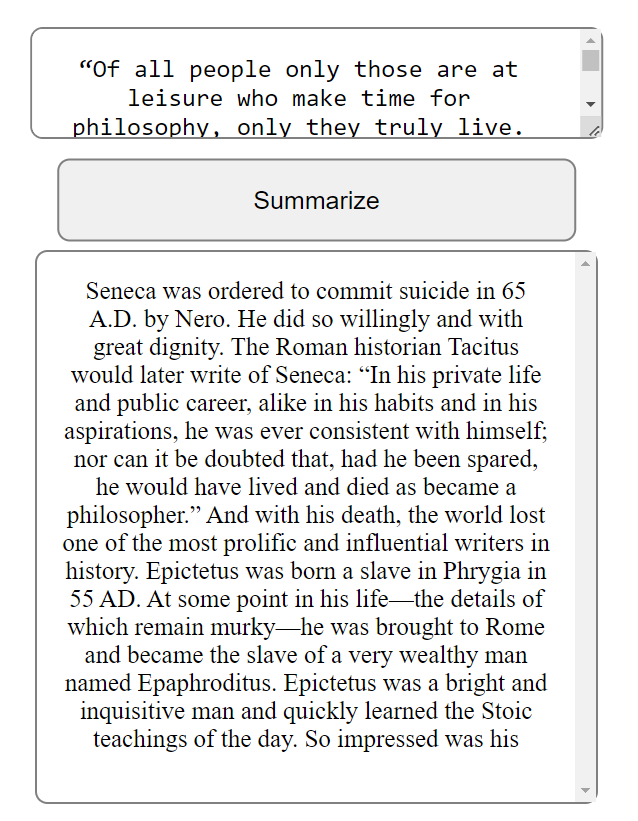
The deluge of information in today’s digital age can be overwhelming, particularly when it comes to reading long-form articles and documents. Summarization techniques can overcome this challenge by succinctly encapsulating the essence of the text into a more digestible form.
In this blog post, I will be chronicling the process of creating a language summarization website using the ChatGPT API. The website will enable users to input a piece of text, and the API will generate a summary of the text in real-time.
The initial step in crafting the website was to establish an account with OpenAI and obtain an API key for the ChatGPT API. With this key, I was able to access the API and initiate making requests.
I decided to utilize Python as the programming language for this project. I employed the requests library to make a POST request to the API endpoint, transmitting the input text and receiving the summary in response.
One key feature that I added to the project is the use of the max_tokens parameter in the API request. This parameter allows me to limit the number of tokens returned by the API, which in turn limits the number of words in the generated summary. This feature can be especially useful when dealing with long pieces of text and ensuring that the summary remains concise and easy to read.
Subsequently, I concentrated on creating the website’s user interface. I employed HTML, CSS, and JavaScript to create a simple text box for the user to input their text and a div to display the summary.
In conclusion, I was able to create a functional language summarization website that is user-friendly and can aid users in efficiently comprehending large amounts of text. The use of the max_tokens parameter enables the website to generate summaries that are concise and easy to read, making it an even more valuable tool.
Overall, creating a language summarization website using the ChatGPT API was a stimulating and educational experience. The API was straightforward to use, and the final outcome is a valuable tool that can assist users in saving time and staying informed.
If you’re interested in creating your own language summarization website, I highly recommend giving the ChatGPT API a try. The possibilities for this technology are endless and can be applied to a wide range of use cases such as news summarization, document summarization, and even chatbot development.
Creating this website was a fun and educational experience, and I hope that it inspires others to explore the potential of language summarization and the ChatGPT API.
Till then! Ps: This blog is generated by ChatGPT!
import openai

# Replace YOUR_API_KEY with the actual API key you obtained from OpenAI
openai.api_key = "YOUR_API_KEY"

def generate_summary(prompt, model):
    completions = openai.Completion.create(
        engine=model,
        prompt=prompt,
        max_tokens=512,
        n=1,
        stop=None,
        temperature=0.5,
    )

    message = completions.choices[0].text
    return message

from flask import Flask, request, render_template
app = Flask(__name__)

@app.route('/', methods=['GET', 'POST'])
def index():
    if request.method == 'POST':
        text = request.form['text']
        summary = generate_summary(text, "text-davinci-002")
        return render_template('index.html', summary=summary)
    return render_template('index.html')

if __name__ == '__main__':
    app.run(debug=True)